Customer Pickup Counter Blocks
Customer Pickup Counter Blocks let players split up the work of preparing and serving customer orders. One player can prepare food or other requested items and place them on a pickup counter while another player serves the waiting customers, or customers stationed at pickup counters can collect their prepared items directly.
Placing or dropping a requested item on a pickup counter gives crafting credit to the player who prepared. Items added by a hopper or without a known player are credited to Automated.
Each pickup counter holds up to 9 item stacks. The stored items are displayed on top of the block, so players can see what is ready without opening an inventory screen. Items are handled in first-in, first-out order: the item that has been waiting the longest is the first one taken from the counter.
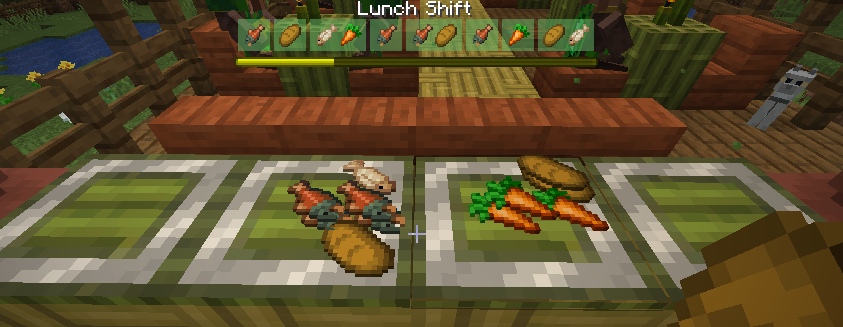
Crafting Customer Pickup Counter Blocks
Craft a pickup counter with a horizontal row containing one iron ingot followed by two matching variant ingredients:
Iron Ingot | Variant Ingredient | Variant Ingredient
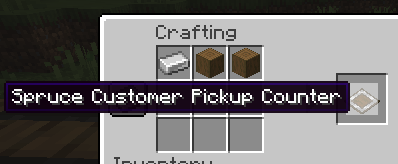
The following variants are available:
- Iron, made with two additional iron ingots
- Copper, made with two copper ingots
- Gold, made with two gold ingots
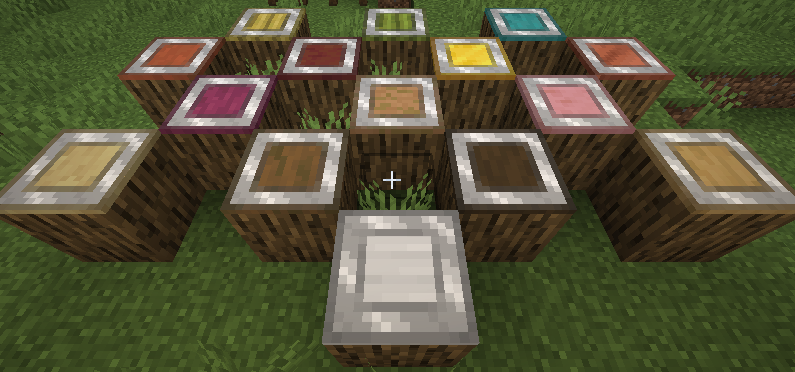
- Oak, spruce, birch, jungle, acacia, dark oak, mangrove, and cherry, made with two matching stripped logs
- Crimson and warped, made with two matching stripped stems
- Bamboo and stripped bamboo, made with two matching full bamboo blocks
Each variant uses the matching block texture, so pickup counters can be coordinated with the materials and decoration used in a kitchen, restaurant, shop, or market stand.
Placing and Taking Items
Right-click a pickup counter while holding an item stack to place the entire held stack onto the counter. Sneak-right-click while holding a stack to place only one item. Right-click with an empty hand to take the entire oldest stack. The counter does not open an inventory screen; all item handling happens directly through these interactions.
Pickup counters accept only items currently wanted by active customers. Existing matching items anywhere in the connected counter network count toward that demand. If customers want only part of a held stack, that portion is placed on the counter and the rest remains in the player’s hand. If no active customer wants the held item, the pickup counter allows the item’s normal block interaction instead. This lets players hoppers and other blocks against a pickup counter.
Dropped items resting on top of a pickup counter are accepted using the same rules. If the item was dropped by a player, that player receives the crafting and serving credit. Items without a known player are credited to Automated.
Hoppers, ownerless dropped items, and compatible automation accept demand only from Customer Spawners assigned to that kind of pickup counter. They can insert wanted items into a pickup counter but cannot extract prepared customer orders. Unwanted items and portions that do not fit remain outside the counter.
Customers spawned from a Customer Spawner that is assigned a Pickup Counter as the counter/table block will try to pick up the items they want from the Pickup Counter.
Empty containers such as bottles, buckets, and bowls are returned to the player credited for each consumed portion. If that player is unavailable or the item was supplied by automation, the containers are dropped on top of the pickup counter.
Payments for player-prepared orders are added to that player’s inventory or dropped when their inventory is full. For Automated orders or when the credited player is unavailable, the customer tries nearby Customer Payment Boxes from nearest to farthest. A payment box is used only when it can hold the entire payment. If no payment box within a 64x64x64 area can hold it, the customer drops the payment.
If all 9 spaces are occupied, the item remains in the player’s hand and a message explains that the pickup counter is full.
Once each second, one pickup counter validates the entire connected network against all nearby active customer demand. Excess items are returned to the player who placed them. If that player’s inventory is full, the remaining items are dropped on top of the pickup counter and the player receives a message. Automated items and items whose player is unavailable are dropped on top of the pickup counter instead. The original player or Automated crafting credit is kept when items are first accepted.
Connecting Pickup Counters
Pickup counters that touch on their north, south, east, or west sides work together as one larger pickup area. Diagonally placed counters and counters above or below each other are not connected.
When a player places an item on a full counter, the item is passed to an available connected counter. This continues through an entire connected row or group of counters until a space is found. Customer demand and stored quantities are also calculated across the complete network. If every connected counter is full, the item stays in the player’s hand.
When a player tries to take an item from an empty counter, it searches its connected neighbors and returns the oldest available item it finds. This lets players add and collect prepared items from a convenient end of a long pickup counter without interacting with each individual block.